What is GIS? A Software's Perspective
🕐 Read time: 6 min
Written By Clark Yuan
Last updated 4 months ago
Overview
GIS stands for Geographic Information System. It is the technology used to create, manage, analyze, visualize, and communicate data that has a location component, which turns out to be almost all data. If something happened somewhere, GIS can help you understand it, map it, and share it.
It is worth noting upfront that GIS and mapping are not the same thing. Mapping is one part of GIS. GIS goes further by allowing you to analyze, layer, and generate insights from spatial data and not just visualize it.
This article explains what GIS is, how it works, the difference between desktop and web-based GIS, and where Stitch3D fits within the GIS ecosystem.
What is GIS?
GIS is a technology that is used to create, manage, analyze, and map all types of data. GIS connects data to a map, integrating location data with all types of descriptive information about what things are like there. This provides a foundation for mapping and analysis used in science and almost every industry. GIS helps users understand patterns, relationships, and geographic context.
The four core things GIS does are worth understanding individually because they map directly to what different tools in your workflow are responsible for:
How does GIS work?
Every piece of information in a GIS has two parts: a location and attributes. A utility pole has coordinates (location) and properties like pole ID, material, height, and last inspection date (attributes). A stockpile has a boundary polygon (location) and properties like volume, material type, and capture date (attributes).
GIS organizes this information into layers consisting of separate datasets that can be stacked, compared, and analyzed together. A typical site Project might include:
A point cloud layer (LiDAR data)
A raster layer (orthomosaic)
A vector layer (site boundary or design surface)
A GCP layer (ground control points)
Annotation layers (measurements and inspection notes)
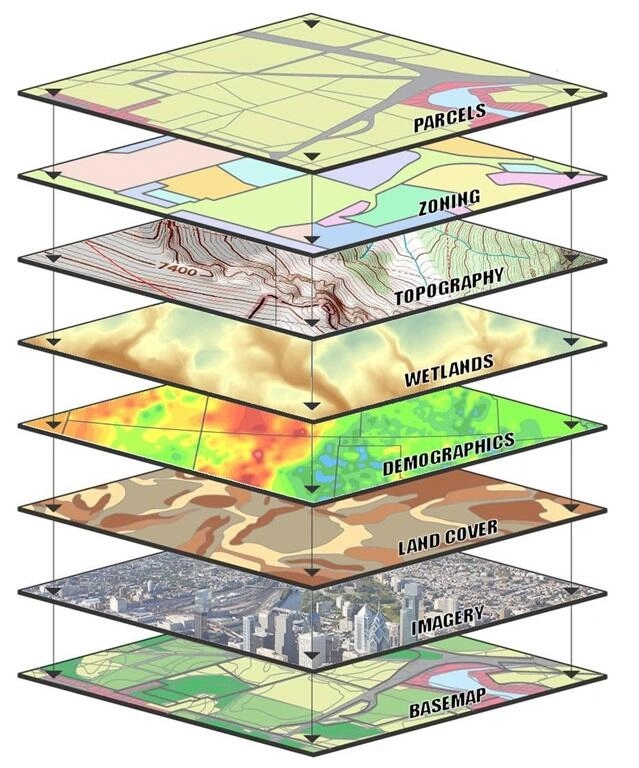
Each layer represents a different kind of spatial information. Stacking them together reveals context and relationships that are invisible when any single layer is viewed alone.
Coordinate systems and projections
One concept that trips up many new GIS users early on is coordinate systems. A coordinate system defines how locations on Earth are represented as numbers. A projection determines how that curved surface is displayed on a flat map or screen.
You will commonly encounter:
WGS84 — a global geographic coordinate system. Latitude and longitude values. Used as the standard for GPS devices and most web mapping platforms.
UTM zones — a projected coordinate system that divides the Earth into zones for more accurate local measurements. Commonly used in surveying, construction, and mining workflows.
State Plane — a projected system used in the United States, optimized for accuracy within specific states or regions.
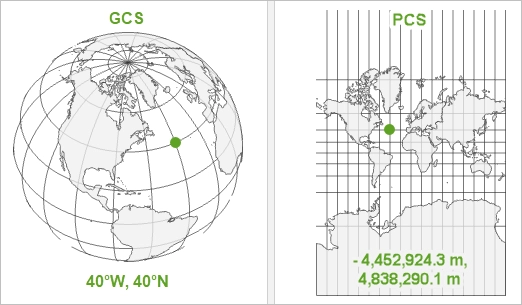
Understanding that different coordinate systems exist — and that your data needs to align to a consistent one — is an important early step in processing GIS data. In Stitch3D, Georeferenced Projects require you to define a horizontal and vertical CRS so that all uploaded files are automatically validated and aligned to the same coordinate system.
💡 Tip: If you are unsure which coordinate system your data uses, check the export settings in your processing software (Metashape, Pix4D, DJI Terra) or look up your region on epsg.io.
Desktop GIS vs. web GIS
GIS software comes in two main forms, and understanding the difference matters for knowing which tool to use at which point in your workflow.
Desktop GIS
Desktop GIS refers to software installed on a local computer. Desktop GIS platforms are the swiss army knives of GIS, used for creating, editing, visualizing, managing, and analyzing geographic data. They offer the deepest processing capability and are where complex spatial analysis, data creation, and point cloud classification typically happen.
Common desktop GIS tools:
Desktop GIS is powerful but comes with real limitations:
Requires installation and local hardware capable of handling large datasets
Data lives on one machine so sharing requires exporting and distributing files
Non-technical stakeholders cannot access it without training
Collaboration is difficult across distributed teams
Web GIS
Web GIS runs entirely in a browser. No installation required. Web GIS gives non-expert GIS users the ability to easily interact with map visualizations and answer their own questions without having to involve a GIS team. The best part is that they can do this from anywhere, anytime, using any web-accessible device.
Cloud-based GIS software refreshes data in real time, giving teams access to the latest information. Modern GIS tools allow teammates to edit and comment on web or mobile, wherever they are working.
The advantages of web GIS for spatial data delivery:
Common web GIS tools
💡 Where Stitch3D differs from the field: DroneDeploy and ROCK Cloud are strong within their own ecosystems — DroneDeploy for photogrammetry workflows it processes itself, ROCK Cloud for ROCK hardware users and data processing. Stitch3D is hardware and processing agnostic: it accepts data from any drone, any scanner, and any processing software. Combined with real-time multiplayer Viewer sessions — where multiple users can be inside the same Project simultaneously — we are purpose-built for teams that need to deliver and collaborate on spatial data across organizations, not just within one.
Where Stitch3D fits in the GIS ecosystem
It is important to understand what Stitch3D is and what it is not.
Stitch3D is not a processing platform. It does not generate orthomosaics, process point clouds, classify LiDAR data, or produce DEMs and DTMs. Those tasks happen in desktop processing software like Pix4D, Metashape, DJI Terra, or RealityCapture before your data reaches Stitch3D.
Stitch3D is the delivery and visualization layer, optimized as the web GIS platform where processed spatial data is hosted, explored, measured, annotated, and shared. GIS gives us a deeper understanding of our world, guiding decisions and actions. Stitch3D is where that understanding happens for the teams and clients who receive your data.
Specifically, Stitch3D handles the last four functions of the GIS stack:
GIS in the industries Stitch3D serves
GIS is embedded in the daily operations of every industry Stitch3D supports. Here is how it applies across Stitch3D's core customer base:
The GIS software stack
Most professional spatial data workflows involve multiple tools used together. It is best to think of GIS software like tools in a toolbox where GIS solutions involve a software stack, meaning several tools are used in unison.
A typical drone mapping and delivery workflow uses three layers:
1. Capture — DJI, Autel, RESEPI, senseFly, Leica, FARO, or other hardware
2. Process — Pix4D, Metashape, DJI Terra, RealityCapture, DroneDeploy
3. Host, View & Deliver — Stitch3D
Each tool does what it is best at. Stitch3D's role is the last mile: taking processed, survey-grade spatial data and making it accessible, interactive, and shareable without requiring the recipient to install a single piece of software.
Related articles
Was this helpful?
Still need help? Ask the team