Ground Control Point (GCP) Overview
🕐 Read time: 6 min
Written By Clark Yuan
Last updated 3 months ago
Overview
If you are new to drone mapping or geospatial data, you may have come across the term "Ground Control Points" without a clear explanation of what they actually are or why they matter. This article explains GCPs from the ground up: what they are, how they work, why accuracy depends on them, and how they are used in Stitch3D.
ℹ️ A note on Stitch3D's role: Stitch3D does not generate GCPs or process point clouds against control. GCPs are created and applied in your photogrammetry or processing software before you upload to Stitch3D. Once uploaded, Stitch3D displays your GCP file for visualization and delivery purposes only so your clients and stakeholders can see your control network alongside the spatial data you have delivered.
What is a Ground Control Point?
A Ground Control Point is a physical marker placed on the ground at a location whose precise real-world coordinates have been measured using survey-grade equipment. Think of it as a reference anchor: a known, trusted point on the Earth's surface that can be tied to your drone data to tell the processing software exactly where everything is.
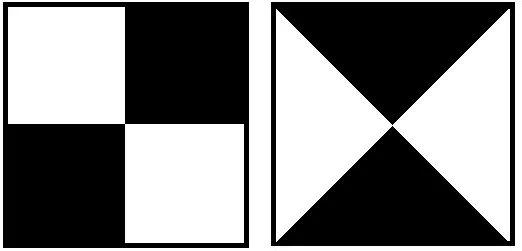
In practice, a GCP is usually a flat, high-contrast target such as a painted cross, a checkerboard tile, or a brightly colored panel that is large enough to appear clearly in aerial imagery. Before a drone flight, a surveyor or operator places these markers across the site and records their exact latitude, longitude, and elevation using a precise instrument such as an RTK GNSS receiver.
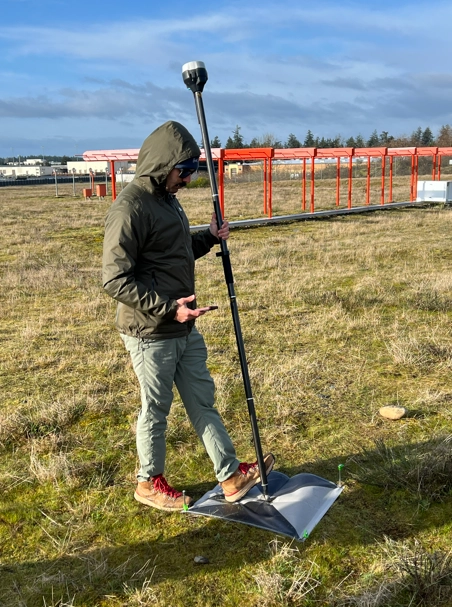
During processing, the software identifies each GCP marker in the drone imagery and matches it to the surveyed coordinates. This pulls the entire dataset into alignment with real-world positions.
ℹ️ A useful analogy: Imagine you have taken a photograph of a map, but you do not know the scale or where it is located. A GCP is like finding a building in the photo that you can measure precisely in real life. Once you know the real-world size and position of that building, you can scale and position the entire photograph correctly. GCPs do the same thing for drone data.
Why does drone data need GCPs?
To understand why GCPs matter, you first need to understand the limitation they are solving.
Every drone has a built-in GPS receiver. That GPS tells the drone where it is when each image is captured. The problem is that standard consumer and enterprise drone GPS carries a positional error of roughly 1 to 5 meters. Think of it like a compass: reliable for general direction, but not for pinpoint precision. For a visual inspection or a rough overview, that is perfectly acceptable. For a survey-grade deliverable — one that will be used to calculate volumes, establish property boundaries, or overlay with engineering drawings — it is not.
Standard GNSS can have positional errors ranging from 1 to 5 meters due to satellite geometry, atmospheric interference, or terrain. For high-precision work, that is a wide margin of error.
GCPs solve this by giving the processing software a set of verified anchor points. When the software finds those targets in the imagery and matches them to their measured coordinates, it corrects the entire model, pulling every measurement, elevation, and feature into accurate real-world alignment.
Relative accuracy vs. absolute accuracy
This is one of the most important concepts in drone mapping, and one of the most commonly confused.
It is possible to have high relative accuracy without GCPs. Many drones can produce internally consistent outputs. That means distances, shapes, and volumes within the map can still be useful for certain tasks. But without GCPs or RTK/PPK corrections, those same outputs might not be correctly georeferenced and result in data that is a few meters off from their actual position.
For workflows where you need to overlay drone data with other spatial layers, compare results across multiple capture dates, or submit outputs for engineering or compliance review, absolute accuracy is essential and GCPs are how you achieve it.
What is a Checkpoint?
A Checkpoint is physically identical to a GCP — same marker, same surveying process. The difference is in how it is used during processing.
A GCP is fed into the processing software to constrain and correct the model. A Checkpoint is deliberately held back from the processing run. After the model is generated, the software compares the processed positions at each Checkpoint location against the actual measured coordinates. The difference between the two is the error, and this is how accuracy is independently verified and reported.
ℹ️ Did you know: Research by the Nevada Department of Transportation found that placing more than 5 to 10 GCPs had very little benefit to accuracy. Five GCPs distributed across the corners and center of a site is the practical starting point for most projects. More are needed for large or topographically complex sites.
💡 Tip: Always designate at least one or two of your markers as Checkpoints rather than using all of them as GCPs. Checkpoints are the independent evidence that your model is as accurate as you are claiming. They are what you show to a client or regulator who asks "how do we know this data is correct?"
What is RTK and PPK? Do they replace GCPs?
RTK (Real-Time Kinematic) and PPK (Post-Processed Kinematic) are GPS correction technologies that provide higher-accuracy positioning directly to the drone during or after flight, often to centimeter level. Many modern drones — such as the DJI Matrice series and Emlid-equipped platforms — support RTK or PPK.
When RTK or PPK is used, fewer physical GCPs may be needed because the drone's own positioning is already highly accurate. In some workflows, RTK or PPK can eliminate the need for GCPs entirely. Pix4D's own testing found that with RTK-enabled drones, GCPs do not meaningfully improve accuracy. However, many professionals still use a small number of GCPs alongside RTK/PPK to independently validate results, especially for regulatory, compliance-grade, or high-stakes deliverables.
ℹ️ Note: Whether or not your workflow uses RTK, PPK, or physical GCPs, the resulting GCP file uploaded to Stitch3D serves the same purpose: confirming the accuracy of your spatial data and making that accuracy visible to your clients and stakeholders.
Why use GCPs? Real-world applications
Standard drone GPS is adequate for visual inspection and general overviews. GCPs become essential when the work requires precise alignment with real-world coordinates:
GCPs in Stitch3D
Once your GCP file has been created and applied in your processing software, you can upload it to Stitch3D as part of your Project delivery.
Stitch3D displays your GCPs and Checkpoints as a checkered square and a red pin icon, respectively, in both the 2D and 3D Viewers, positioned at their real-world coordinates. Each icon is individually labeled and distinguishable by type.
You can also attach an accuracy report PDF directly to the GCP file in Stitch3D. Once attached, the report is downloadable by any user you share the Project with, giving your clients direct access to the documented accuracy of the data you have delivered.
💡 Tip: Attaching an accuracy report to your GCP file in Stitch3D turns a technical deliverable into a professional one. Your client gets the spatial data and the documented proof of its accuracy in the same shared link — no follow-up email required.