Contact support
🕐 Read time: 3 min
Written By Clark Yuan
Last updated 4 months ago
Overview
Stitch3D offers different levels of support.
💡 The level of support you receive depends on your account type and subscription.
Support contact options by plan and account type
How to use the Stitch3D Help Center
Navigate to the Stitch3D Tutorials page, located under the Resources drop down option in the Stitch3D landing page.
Explore the Quick Help and Documents sections.
If you have any questions about plans or pricing, navigate to the Contact page and submit an inquiry.
How to use the Stitch3D in-app support
Log in to your Stitch3D account.
Locate the “Report a Bug” button in the bottom right corner of the application.

Enter your name, email, and describe the issue you are experiencing.
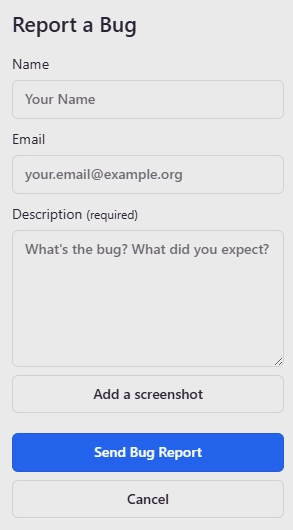
Add a screenshot if desired.
Click Send Bug Report
Our team will return your inquiry within 48 hours.
How to use the Stitch3D Email support
Navigate to the Stitch3D Contact Page.
Enter your First and Last Name, Email Address, and type your message.
Click Submit.
If you’re on the Stitch3D Starter plan, you’ll receive an email response within three business days (Monday-Friday).
If you’re on the Stitch3D Personal or Pro plans, you’ll receive an email response within one business day (Monday-Friday).
If you’re on the Stitch3D Enterprise Plan, you’ll receive an email response within six hours, any day of the week.
How to use the Stitch3D Live Chat and Phone Support
If you’re on the Stitch3D Pro or Enterprise Plans, live chat and phone support are available during U.S. Eastern Standard Time business hours (9:00am - 5:00pm, Monday-Friday).
A dedicated Stitch3D representative will reach out to you with personal concierge information.
Stitch3D corporate office address
Stitch3D, Inc
1004 Masonic Ave
San Francisco, CA 94117
United States
Related articles
How to change your email and password